

Blockchain explorer
Run BTC RPC Explorer on Node.js 22 behind Caddy HTTPS. Private lookup for blocks, transactions, mempool, fee estimates, UTXO queries. No leakage to public explorers.
Querying a public block explorer is one of the sneakiest ways to leak your financial activity. Every address you search, every transaction ID you paste, every fee chart you refresh tells the explorer operator "this address matters to somebody at this IP." Trust your own node instead.
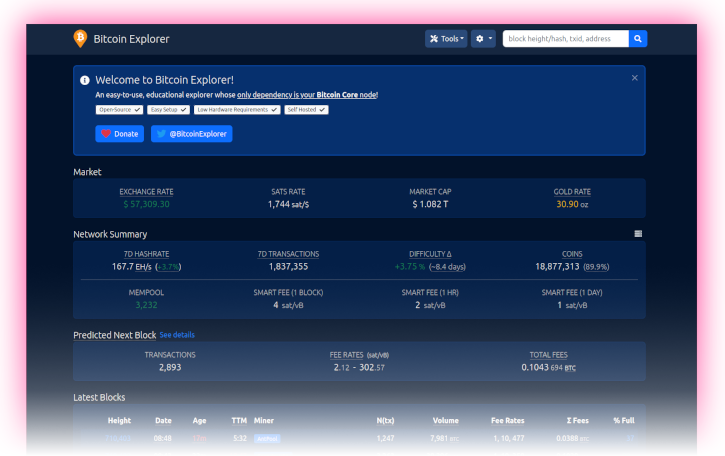
BTC RPC Explorer is a small, database-free web UI by Daniel McNally. It talks to your Bitcoin Core over RPC and to Electrs for address balance queries, gives you a clean browser interface for blocks, transactions, mempool, and fee estimates, and never phones home.
What you'll do
- Install Node.js 22 LTS from NodeSource.
- Create a dedicated
btcrpcexploreruser and clone the app. - Wire up the
.envconfig so it readsbitcoind's cookie and queries Electrs for address data. - Run it as a systemd service.
- Put Caddy in front for HTTPS on the LAN.
Prerequisites
You finished Bitcoin client and
Electrum server. Bitcoin Core is
fully synced (verificationprogress at 1.0), txindex=1
is in bitcoin.conf (the default config in this guide already has
it), and Electrs is indexed and answering queries.
Install Node.js 22 LTS
Debian 13 ships Node.js 20; BTC RPC Explorer is tested against
Node 22. Add the NodeSource repo so apt upgrade keeps it current.
-
Add the NodeSource repository:
curl -fsSL https://deb.nodesource.com/setup_22.x | sudo -E bash -Install Node.js:
sudo apt install nodejs -
Confirm the runtime version:
node --versionConfirm the package manager version:
npm --versionExpected output is a
v22.xline fromnode, and a10.xor newer line fromnpm.
Create the service user
Create the service user:
sudo adduser --disabled-password --gecos "" btcrpcexplorerAdd it to the bitcoin group:
sudo adduser btcrpcexplorer bitcoinThe bitcoin group membership is what lets the explorer read
/data/bitcoin/.cookie for RPC authentication.
Install BTC RPC Explorer
-
Switch to the new user:
sudo su - btcrpcexplorerResolve the latest release tag into a
VERSIONshell variable:VERSION=$(curl -sL https://api.github.com/repos/janoside/btc-rpc-explorer/releases/latest | grep -oP '"tag_name": "v\K[^"]+')Echo it back so you can sanity-check what you're about to install:
echo "Installing BTC RPC Explorer $VERSION" -
Clone the source for that tag:
git clone --branch "v$VERSION" https://github.com/janoside/btc-rpc-explorer.gitMove into the new directory:
cd btc-rpc-explorerPull in dependencies with npm. Expect this to take 10 to 20 minutes on a Pi 5, a lot of native modules get built from source:
npm install
About the npm audit noise
npm install will print warnings about vulnerabilities in transitive
dependencies. Read them, but don't panic. The explorer serves only
to you on your LAN; the realistic threat surface is your own
browser, not a remote attacker poking at the Express server. Don't
blindly npm audit fix, it'll break things.
Configure
The explorer reads its config from .env in the install directory.
A heavily commented template ships with the source. You only need to
change a handful of lines.
-
Copy the template:
cp .env-sample .envOpen it for editing:
nano .env -
Set the Bitcoin Core connection (cookie auth, no password to leak):
BTCEXP_BITCOIND_HOST=127.0.0.1 BTCEXP_BITCOIND_PORT=8332 BTCEXP_BITCOIND_COOKIE=/data/bitcoin/.cookie BTCEXP_BITCOIND_RPC_TIMEOUT=10000 -
Route address-balance queries through your local Electrs so they never leak to a third party:
BTCEXP_ADDRESS_API=electrum BTCEXP_ELECTRUM_SERVERS=tcp://127.0.0.1:50001 -
Pick a privacy posture. "More information" mode pulls exchange rates and a few other externally-hosted tidbits over the public internet:
BTCEXP_PRIVACY_MODE=false
BTCEXP_NO_RATES=false
Or lock it down completely:
BTCEXP_PRIVACY_MODE=true BTCEXP_NO_RATES=true -
(Optional) Gate the UI with a password. Any username works; only the password is checked. Use password [D] from Preparations:
BTCEXP_BASIC_AUTH_PASSWORD=YourPasswordD -
Dark theme, because it's a block explorer and you're not a monster:
BTCEXP_UI_THEME=dark -
Save, exit, and drop back to
admin:exit
Run it once by hand
Before handing it to systemd, start it manually to shake out any config mistakes.
Switch to the service user:
sudo su - btcrpcexplorerMove into the install directory:
cd ~/btc-rpc-explorerRun the app in the foreground:
npm run startThe explorer should bind to http://127.0.0.1:3002. If the console
fills with RPC errors, Bitcoin Core is either not running or still
reindexing, leave this alone until bitcoin-cli getblockchaininfo
reports a verificationprogress at 1.0.
Stop it with Ctrl-C and exit back to admin:
exitSystemd unit
-
Create the service file:
sudo nano /etc/systemd/system/btcrpcexplorer.service -
Paste:
# RaspiBolt: systemd unit for BTC RPC Explorer # /etc/systemd/system/btcrpcexplorer.service [Unit] Description=BTC RPC Explorer Wants=bitcoind.service electrs.service After=bitcoind.service electrs.service [Service] WorkingDirectory=/home/btcrpcexplorer/btc-rpc-explorer ExecStart=/usr/bin/npm start User=btcrpcexplorer Restart=on-failure RestartSec=30 # Hardening PrivateTmp=true NoNewPrivileges=true [Install] WantedBy=multi-user.target -
Enable the service so it starts on boot:
sudo systemctl enable btcrpcexplorerStart it now:
sudo systemctl start btcrpcexplorerFollow the log and watch for a "listening on port 3002" line, then
Ctrl-C:sudo journalctl -f -u btcrpcexplorer
HTTPS on the LAN with Caddy
The explorer's Express server speaks HTTP on port 3002. You want browser access over HTTPS, and you want it without fighting certificate tooling. Caddy handles this in five lines of config and issues itself a certificate from its own internal CA.
Install Caddy
The official Caddy apt repo is the right source. One-time setup.
Install the helper packages needed to add a third-party repo over HTTPS:
sudo apt install -y debian-keyring debian-archive-keyring apt-transport-https curlImport Caddy's signing key into a dedicated keyring:
curl -1sLf 'https://dl.cloudsmith.io/public/caddy/stable/gpg.key' \
  | sudo gpg --dearmor -o /usr/share/keyrings/caddy-stable-archive-keyring.gpg
Add the Caddy stable apt source:
curl -1sLf 'https://dl.cloudsmith.io/public/caddy/stable/debian.deb.txt' \
  | sudo tee /etc/apt/sources.list.d/caddy-stable.list
Refresh the package index:
sudo apt updateInstall Caddy:
sudo apt install caddyConfirm it landed:
caddy versionConfigure the reverse proxy
-
Open the Caddyfile:
sudo nano /etc/caddy/Caddyfile -
Replace the default welcome-page stanza with:
# RaspiBolt: Caddy HTTPS reverse proxy
# /etc/caddy/Caddyfile

# BTC RPC Explorer
:4000 {
  tls internal
  reverse_proxy 127.0.0.1:3002
}
tls internaltells Caddy to mint and manage a self-signed certificate from its own CA, no public DNS needed. -
Reload Caddy so it picks up the new config:
sudo systemctl reload caddyOpen the firewall port:
sudo ufw allow 4000/tcp comment 'BTC RPC Explorer (Caddy)' -
Point your browser at
https://raspibolt.local:4000(or the Pi's IP address). Click past the browser's one-time certificate warning, self-signed certs trigger that, and on a LAN it's fine.
Trust Caddy's CA on your computer (optional)
Tired of the certificate warning? Caddy's internal CA root lives
at /var/lib/caddy/.local/share/caddy/pki/authorities/local/root.crt
on the Pi. Copy that file to your computer, import it into the
system trust store, and all the Caddy-fronted services on this node
will be trusted without prompting. Skip this if you'd rather keep
the CA contained to the Pi, first-use trust is fine too.
Main takeaway: you can now browse blocks, transactions, and
fee estimates at https://raspibolt.local:4000 without telling
anyone else what you're looking at.
Remote access over Tor (optional)
Want the explorer available from a phone on mobile data? Expose it as a Tor hidden service and visit it through Tor Browser.
-
Add a stanza to
/etc/tor/torrc:sudo nano /etc/tor/torrc# Hidden service: BTC RPC Explorer HiddenServiceDir /var/lib/tor/hidden_service_btcrpcexplorer/ HiddenServiceVersion 3 HiddenServicePort 80 127.0.0.1:3002 -
Reload Tor so it picks up the new hidden service:
sudo systemctl reload torFetch the generated
.onionaddress:sudo cat /var/lib/tor/hidden_service_btcrpcexplorer/hostname -
Open that address in the Tor Browser. No certificates, no warnings, Tor's own end-to-end encryption replaces TLS.
Updating BTC RPC Explorer later
-
Stop the service:
sudo systemctl stop btcrpcexplorerSwitch to the app user:
sudo su - btcrpcexplorer -
Move into the install directory:
cd ~/btc-rpc-explorerFetch the latest tags:
git fetchDiscard any local changes:
git reset --hard HEADResolve the newest version tag into a shell variable:
VERSION=$(git tag | sort --version-sort | tail -n 1)Sanity-check the resolved version:
echo "Upgrading to $VERSION"Check out that tag:
git checkout "$VERSION"Refresh dependencies:
npm installDrop back to
admin:exit -
Restart:
sudo systemctl start btcrpcexplorer
Always skim the changelog first, breaking changes are rare but not unheard of.
Electrum server
Build Electrs from source, index the blockchain for Electrum-protocol wallets, wrap the raw TCP port in TLS with stunnel so Sparrow, Electrum, and hardware wallets can connect privately.
Desktop wallet
Point Sparrow Wallet at your own Electrs over TLS. Watch-only wallets, hardware wallet integration, coin control, labelling UTXOs, air-gapped PSBT signing.